Analytical Volumetric Light Cones, Stealth Vision Cones & Fog of War in Unity 6 URP
Zero-raymarch URP 17 volumetric light cones with Fresnel grazing fade and soft depth intersection, raycast-occluded stealth floor vision cones, and WebGL-2-safe R8 Fog of War masks in Unity 6.
- volumetric
- spotlight
- light-cone
- god-rays
- stealth
- vision-cone
- fog-of-war
- lighting
- shader
- urp
No demo.
When to Use & Field Best Practices
Full-screen raymarched volumetric fog tanks frame rates on WebGL 2, mobile phones, Quest VR, and CPU llvmpipe captures. For spotlights, lighthouse beams, security drones, dungeon sunbeams, stealth patrols, and tactics maps, analytical mesh volumes + lightweight GPU masks deliver crisp readability at < 0.1 ms:
- Analytical Volumetric Light Cones (
Custom/VolumetricLightCone): Place a tapered cone mesh aligned to aSpotLight(or window shaft). Fade brightness smoothly at grazing edges viapow(abs(dot(N, V)), _FresnelPower), along axial length1 - uv.y, and softly where the cone meets walls/floors using_CameraDepthTexture. Zero raymarching loops, 100% WebGL 2 & Quest VR safe! - Obstacle-Occluded Stealth Vision Cones (
StealthVisionCone): Cast24–48horizontal rays inFixedUpdate(throttled to15–20 Hz) to build a dynamic fanMeshthat wraps cleanly around walls and pillars instead of clipping through solid cover. Shift its color acrossPatrol -> Suspicious -> Alertso stealth gameplay reads instantly without UI clutter. - Zero-Compute R8 Fog of War (
FogOfWarMask): Maintain a128×128TextureFormat.R8explored/currently-visible map updated on the CPU (SetPixelData+Apply(false)) and bound globally (_FogOfWarTex,_FogOfWarBounds). It works identically on WebGL 2, WebGPU, andllvmpipewith zeroComputeShaderdependency, and resets cleanly across Play Mode domain-reload-off runs.
Mathematical & Algorithmic Core
- Analytical Cone Attenuation: For local axial progress
v ∈ [0, 1](apex to base), view-normal grazingg = |N·V|^p_f, camera near-faden = saturate((d_cam - d_min) / d_fade), and scene-depth softnesss = saturate((z_scene - z_cone) / d_soft): $α = α_0 · (1 - v)^p_a · g · n · s · (0.85 + 0.15\,dust(u, v, t))$ - Fog-of-War World UV:
u = (p_xz - b_min) / (b_max - b_min), encoding0= unexplored,0.45= explored memory,1.0= live line-of-sight.
Engine Implementation
1. URP Analytical Volumetric Light Cone Shader (Assets/Game/Resources/Shaders/VolumetricLightCone.shader)
Shader "Custom/VolumetricLightCone"
{
    Properties
    {
        [HDR] _ConeColor ("Cone Color (HDR)", Color) = (1.0, 0.88, 0.62, 0.28)
        _Params ("FresnelPow, AxialPow, SoftDepth, NearFade", Vector) = (2.2, 1.6, 0.85, 1.4)
        _DustParams ("DustScale, DustSpeed, DustAmount, Unused", Vector) = (6.0, 0.35, 0.22, 0.0)
    }
    SubShader
    {
        Tags { "RenderPipeline" = "UniversalPipeline" "Queue" = "Transparent" "RenderType" = "Transparent" }
        Pass
        {
            Name "VolumetricConeForward"
            Tags { "LightMode" = "UniversalForward" }
            Blend SrcAlpha One
            ZWrite Off
            Cull Off

            HLSLPROGRAM
            #pragma vertex vert
            #pragma fragment frag
            #pragma multi_compile_instancing

            #include "Packages/com.unity.render-pipelines.universal/ShaderLibrary/Core.hlsl"
            #include "Packages/com.unity.render-pipelines.universal/ShaderLibrary/DeclareDepthTexture.hlsl"

            CBUFFER_START(UnityPerMaterial)
                half4 _ConeColor;
                float4 _Params;
                float4 _DustParams;
            CBUFFER_END

            struct Attributes
            {
                float4 positionOS : POSITION;
                float3 normalOS : NORMAL;
                float2 uv : TEXCOORD0;
                UNITY_VERTEX_INPUT_INSTANCE_ID
            };

            struct Varyings
            {
                float4 positionCS : SV_POSITION;
                float3 positionWS : TEXCOORD0;
                float3 normalWS : TEXCOORD1;
                float2 uv : TEXCOORD2;
                float4 screenPos : TEXCOORD3;
                UNITY_VERTEX_INPUT_INSTANCE_ID
            };

            Varyings vert(Attributes input)
            {
                Varyings o;
                UNITY_SETUP_INSTANCE_ID(input);
                UNITY_TRANSFER_INSTANCE_ID(input, o);
                VertexPositionInputs pos = GetVertexPositionInputs(input.positionOS.xyz);
                o.positionCS = pos.positionCS;
                o.positionWS = pos.positionWS;
                o.normalWS = TransformObjectToWorldNormal(input.normalOS);
                o.uv = input.uv;
                o.screenPos = ComputeScreenPos(pos.positionCS);
                return o;
            }

            half4 frag(Varyings input) : SV_Target
            {
                UNITY_SETUP_INSTANCE_ID(input);
                float3 N = normalize(input.normalWS);
                float3 toCam = GetCameraPositionWS() - input.positionWS;
                float camDist = length(toCam);
                float3 V = toCam / max(1e-4, camDist);

                float edgeFade = pow(saturate(abs(dot(N, V))), _Params.x);
                float axialFade = pow(saturate(1.0 - input.uv.y), _Params.y) * smoothstep(0.0, 0.08, input.uv.y);
                float nearFade = smoothstep(0.25, max(0.35, _Params.w), camDist);

                float2 screenUV = input.screenPos.xy / max(1e-4, input.screenPos.w);
                float rawDepth = SampleSceneDepth(screenUV);
                float sceneEye = LinearEyeDepth(rawDepth, _ZBufferParams);
                float fragEye = LinearEyeDepth(input.positionCS.z, _ZBufferParams);
                float depthSoft = saturate((sceneEye - fragEye) / max(0.05, _Params.z));

                float dustA = sin(input.uv.x * _DustParams.x * TWO_PI + _Time.y * _DustParams.y) * 0.5 + 0.5;
                float dustB = sin(input.uv.y * _DustParams.x * 3.1 - _Time.y * _DustParams.y * 1.4) * 0.5 + 0.5;
                float dust = lerp(1.0, 0.72 + 0.56 * dustA * dustB, _DustParams.z);

                float alpha = _ConeColor.a * edgeFade * axialFade * nearFade * depthSoft * dust;
                return half4(_ConeColor.rgb * alpha, alpha);
            }
            ENDHLSL
        }
    }
}
2. Raycast-Occluded Stealth Vision Cone (Assets/Game/Runtime/Rendering/StealthVisionCone.cs)
using UnityEngine;

namespace __NS__
{
    /// <summary>
    /// Builds a floor-hugging, obstacle-occluded stealth vision fan updated at a fixed cadence
    /// with zero per-frame mesh allocations.
    /// </summary>
    [RequireComponent(typeof(MeshFilter), typeof(MeshRenderer))]
    public sealed class StealthVisionCone : MonoBehaviour
    {
        public float range = 11f;
        [Range(15f, 160f)] public float fieldOfViewDeg = 65f;
        [Range(12, 48)] public int rayCount = 28;
        public float rayHeightOffset = 0.6f;
        public float floorLift = 0.05f;
        public LayerMask obstacleMask = ~0;
        public Color patrolColor = new Color(0.95f, 0.84f, 0.32f, 0.24f);
        public Color alertColor = new Color(0.96f, 0.24f, 0.18f, 0.38f);

        static readonly int BaseColorId = Shader.PropertyToID("_BaseColor");
        Mesh mesh;
        Vector3[] verts;
        Vector2[] uvs;
        int[] tris;
        MeshRenderer meshRenderer;
        MaterialPropertyBlock mpb;
        float timer;
        float alertBlend;

        void Awake()
        {
            meshRenderer = GetComponent<MeshRenderer>();
            mpb = new MaterialPropertyBlock();
            AllocateMesh();
        }

        void OnDestroy()
        {
            if (mesh != null) Destroy(mesh);
        }

        void AllocateMesh()
        {
            int count = Mathf.Clamp(rayCount, 12, 64);
            mesh = new Mesh { name = "StealthVisionFan" };
            mesh.MarkDynamic();
            verts = new Vector3[count + 2];
            uvs = new Vector2[count + 2];
            tris = new int[count * 3];
            for (int i = 0; i < count; i++)
            {
                tris[i * 3] = 0;
                tris[i * 3 + 1] = i + 1;
                tris[i * 3 + 2] = i + 2;
            }
            GetComponent<MeshFilter>().sharedMesh = mesh;
        }

        public void SetAlert(float level01)
        {
            alertBlend = Mathf.Clamp01(level01);
            if (meshRenderer != null && mpb != null)
            {
                meshRenderer.GetPropertyBlock(mpb);
                mpb.SetColor(BaseColorId, Color.Lerp(patrolColor, alertColor, alertBlend));
                meshRenderer.SetPropertyBlock(mpb);
            }
        }

        void FixedUpdate()
        {
            timer += Time.fixedDeltaTime;
            if (timer < 0.05f) return;
            timer = 0f;
            RebuildFan();
        }

        public void RebuildFan()
        {
            if (mesh == null) AllocateMesh();
            int steps = verts.Length - 2;
            float halfFov = fieldOfViewDeg * 0.5f;
            Vector3 originWS = transform.position + Vector3.up * rayHeightOffset;

            verts[0] = new Vector3(0f, floorLift, 0f);
            uvs[0] = new Vector2(0.5f, 0f);

            for (int i = 0; i <= steps; i++)
            {
                float t = (float)i / steps;
                float angle = Mathf.Lerp(-halfFov, halfFov, t);
                Vector3 localDir = Quaternion.Euler(0f, angle, 0f) * Vector3.forward;
                Vector3 worldDir = transform.TransformDirection(localDir);

                float hitDist = range;
                if (Physics.Raycast(originWS, worldDir, out RaycastHit hit, range, obstacleMask, QueryTriggerInteraction.Ignore))
                    hitDist = hit.distance;

                verts[i + 1] = localDir * hitDist + Vector3.up * floorLift;
                uvs[i + 1] = new Vector2(t, hitDist / Mathf.Max(0.01f, range));
            }

            mesh.vertices = verts;
            mesh.uv = uvs;
            mesh.triangles = tris;
            mesh.RecalculateBounds();
        }
    }
}
3. WebGL-2-Safe CPU-Backed R8 Fog of War Mask (Assets/Game/Runtime/Rendering/FogOfWarMask.cs)
using UnityEngine;

namespace __NS__
{
    /// <summary>
    /// Zero-compute R8 Fog of War mask (0 = unseen, 115 = explored, 255 = live sight)
    /// bound globally for terrain/floor shaders on WebGL 2, WebGPU, and desktop.
    /// </summary>
    public sealed class FogOfWarMask : MonoBehaviour
    {
        public Vector2 worldMin = new Vector2(-40f, -40f);
        public Vector2 worldMax = new Vector2(40f, 40f);
        [Range(32, 256)] public int resolution = 128;

        static readonly int FogTexId = Shader.PropertyToID("_FogOfWarTex");
        static readonly int FogBoundsId = Shader.PropertyToID("_FogOfWarBounds");

        Texture2D tex;
        byte[] cells;

        [RuntimeInitializeOnLoadMethod(RuntimeInitializeLoadType.SubsystemRegistration)]
        static void ResetStatics()
        {
            Shader.SetGlobalTexture(FogTexId, Texture2D.whiteTexture);
            Shader.SetGlobalVector(FogBoundsId, new Vector4(-40f, -40f, 80f, 80f));
        }

        void Awake()
        {
            int res = Mathf.Clamp(resolution, 32, 256);
            cells = new byte[res * res];
            tex = new Texture2D(res, res, TextureFormat.R8, false, true)
            {
                wrapMode = TextureWrapMode.Clamp,
                filterMode = FilterMode.Bilinear,
                name = "FogOfWarR8",
            };
            Upload();
        }

        void OnDestroy()
        {
            if (tex != null) Destroy(tex);
        }

        public void DecayLiveSight()
        {
            for (int i = 0; i < cells.Length; i++)
                if (cells[i] > 115) cells[i] = 115;
        }

        public void RevealCircle(Vector3 worldPos, float radius)
        {
            int res = tex.width;
            Vector2 size = worldMax - worldMin;
            float cx = (worldPos.x - worldMin.x) / Mathf.Max(0.01f, size.x) * res;
            float cz = (worldPos.z - worldMin.y) / Mathf.Max(0.01f, size.y) * res;
            float rx = radius / Mathf.Max(0.01f, size.x) * res;
            float rz = radius / Mathf.Max(0.01f, size.y) * res;
            int minX = Mathf.Max(0, Mathf.FloorToInt(cx - rx));
            int maxX = Mathf.Min(res - 1, Mathf.CeilToInt(cx + rx));
            int minZ = Mathf.Max(0, Mathf.FloorToInt(cz - rz));
            int maxZ = Mathf.Min(res - 1, Mathf.CeilToInt(cz + rz));
            float invRx = 1f / Mathf.Max(0.5f, rx);
            float invRz = 1f / Mathf.Max(0.5f, rz);

            for (int z = minZ; z <= maxZ; z++)
            {
                float dz = (z - cz) * invRz;
                for (int x = minX; x <= maxX; x++)
                {
                    float dx = (x - cx) * invRx;
                    if (dx * dx + dz * dz <= 1f) cells[z * res + x] = 255;
                }
            }
        }

        public void Upload()
        {
            if (tex == null) return;
            tex.SetPixelData(cells, 0);
            tex.Apply(false, false);
            Vector2 size = worldMax - worldMin;
            Shader.SetGlobalTexture(FogTexId, tex);
            Shader.SetGlobalVector(FogBoundsId, new Vector4(worldMin.x, worldMin.y, Mathf.Max(0.01f, size.x), Mathf.Max(0.01f, size.y)));
        }
    }
}
Browser, Mobile & Software-Renderer Budgets
- Zero Compute Shaders: Every effect above runs identically on WebGL 2, WebGPU, Quest VR, and CPU
llvmpipewithoutSystemInfo.supportsComputeShaders. - URP Depth Texture Flag: Ensure
urpAsset.supportsCameraDepthTexture = truesoVolumetricLightConesoftens cleanly against walls and floors instead of showing hard intersection lines. - Vision Cone Throttling: Keep
rayCount <= 32and update at20 Hz(0.05 s) so 10 patrolling guards add< 0.15 msof physics cost.
Verification Checklist
- Run
compileand verify zero C# or URP HLSL compiler errors. - Assign
Custom/VolumetricLightConeto a searchlight cone mesh (disable shadow casting on itsMeshRenderer) and verify soft edges inCaptures/*.png. - Place a wall inside a
StealthVisionConerange and verify the fan mesh terminates cleanly along the wall face.
Official references
- hsimpson — Volumetric Spotlight Fresnel Reference (MIT)
- mkwozniak — mangofogunity (MIT)
- d-bucur — Raycasted Vision Cone Reference (MIT)
- Unity 6 URP 17.6 Core & DeclareDepthTexture ShaderLibrary Reference
Open-source sources
- Takes an idea from Unity-URP-Volumetric-Light by CristianQiu (MIT License): URP Fresnel and soft depth-fade volumetric light cone formulation
- Takes an idea from mangofogunity by mkwozniak (MIT License): R8 mask Fog of War architecture
Games built with this guide carry these credits, and the licence notices they ask for, in their third-party notices.
More Unity 6 games
Games made with GameCrew on the same engine. No game has been built with this guide yet: these show what Unity 6 games here look like.
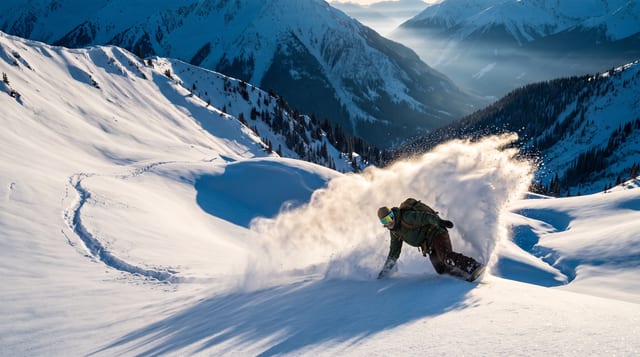
Bottomless
Drop into a waist-deep powder bowl on the morning after the storm and feel every turn throw a wall of snow into the sun.
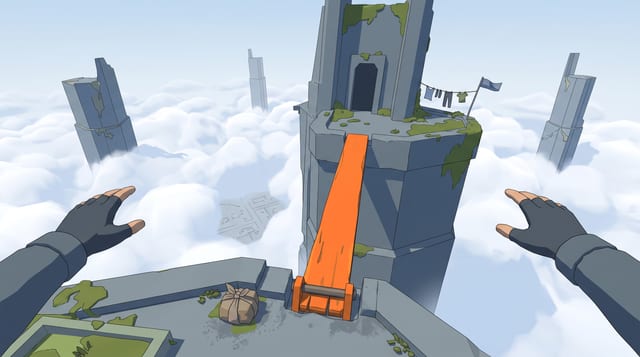
Thin Air Errands
Three hundred metres up, with a storm on the way, you carry your own plank between rooftops, lay it across the gap, and walk it with your arms out.
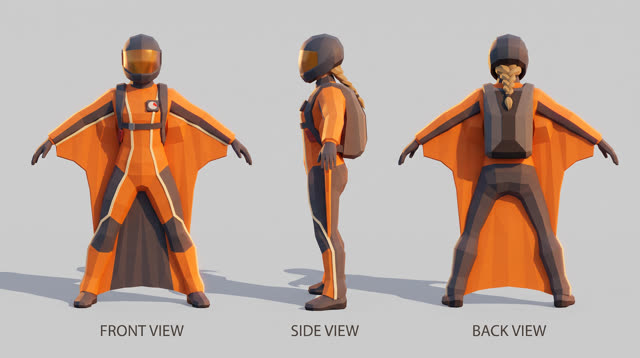
Fjordline
Leap from a granite wall under the midnight sun and carve one unbroken wingsuit line through Norway's most dramatic landscapes, from summit to sea, skimming close enough to touch the rock.
More Unity 6 techniques
Atmospheric Height Fog, Sun Shafts & Rim-Readable Lighting in Unity 6 URP →
Three-point outdoor/interior URP lighting recipe combining directional sun + warm/cool fill, exponential height/distance fog, ACES/Neutral post-processing, and anti-darkness floors so captures never read black or washed out.
Context Steering, Telegraphed Combat & Attack-Token Encounters in Unity 6 →
Readable enemy and companion AI in Unity 6 using 8-ray context steering maps, FOV + line-of-sight hysteresis, telegraph/active/recovery state machines, and an encounter attack-token director.
Khronos PBR Neutral Tone Mapping & 2D Radiance Cascades GI in Unity 6 URP →
Hue-preserving Khronos PBR Neutral display transform via Unity 6 URP 17.6 RenderGraph (preventing ACES red/blue hue shifts on stylized palettes) paired with a WebGL-2-safe fragment Radiance Cascades 2D GI shader.
Volumetric Cloud Rendering in Unity 6 URP →
Height-band raymarched volumetric cloud dome in Unity 6 URP HLSL using Perlin-Worley FBM, Schneider's Beer-Powder law, dual-lobe Henyey-Greenstein silver lining, interleaved gradient noise jitter, WebGL 2 loop/LOD rules, and llvmpipe step scaling.
Use verified techniques inside a real game
Describe your game idea for free or connect an MCP assistant to search and contribute techniques.