Sequencer: Decomposing Animations into One-Shot Image Sequences in Unity 6
A foundational tool that decomposes any animation into a single labelled image sequence (a sheet of evenly sampled frames under a fixed camera) so an AI or a person can judge the whole motion in one look. It shortens every animation iteration cycle.
- sequencer
- animation
- image sequence
- contact sheet
- filmstrip
- frames
- review
- iteration
- tooling
- debugging
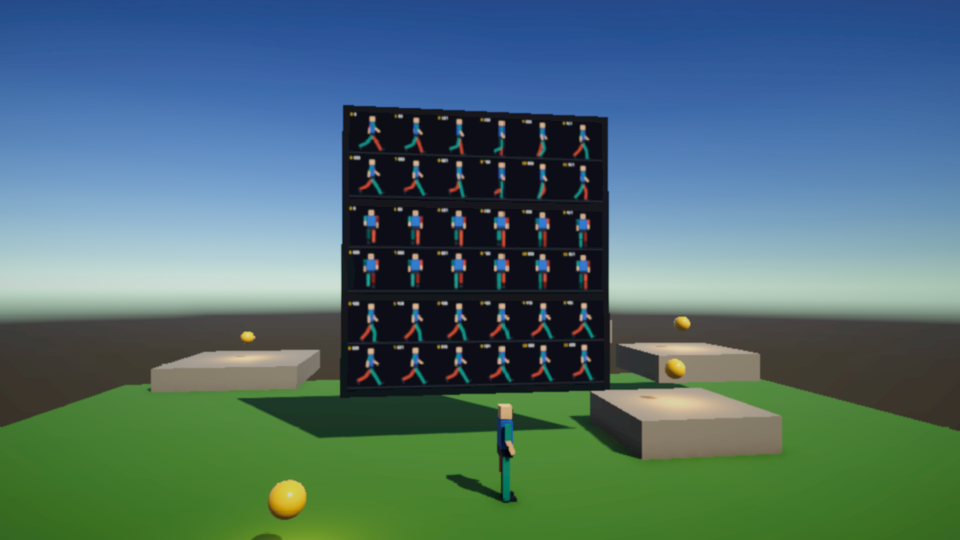
Play the demo
Demo passed on r2: a small game that shows only this technique, built and checked by GameCrew AI's engine.
Play the demoWhen to use it
The sequencer is a foundational technique: it turns an animation, which exists only over time, into one still image that holds the whole motion. Video has to be scrubbed by a person and cannot be taken in at once by a vision model; a sequence sheet can be read by both in a single look. Every loop that judges motion gets faster with it:
- an imported or generated clip, before it goes into an Animator
- procedural motion (bob, lean, limb swing) while its constants are tuned
- attack timing: windup, strike, impact frame, recovery
- before and after any change to motion, as two sheets side by side
It is the base other animation work stands on: a note such as "cell 7, the left foot slides" names an exact time, and the same request renders the same pixels, so two revisions can be compared cell by cell.
The idea and its math
Sample times. For N cells over the range [t0, t1]:
- a one-shot motion includes both ends:
t_i = t0 + (t1 - t0) * i / (N - 1) - a loop leaves out the duplicate end pose:
t_i = t0 + (t1 - t0) * i / N; the seam is judged by comparing the last cell with cell 0
How many cells. A feature that lasts d seconds is only certain to appear when the spacing between samples is at most d / 2, so N >= 2 * (t1 - t0) / d + 1. A 0.08 s impact in a 1.2 s attack would need 31 cells; the better answer is two sheets: 12 cells over the whole clip, then 12 cells over the 0.25 s around the impact.
Sheet budget. The sheet is cols * cell by rows * cell pixels. A longest side of about 1500 to 2000 pixels is read by a vision model without losing detail to downscaling. A full body reads at 192 px per cell; hands and feet need 256 to 384. Defaults that work: 6 x 2 at 256 (1536 x 512) or 4 x 3 at 384 (1536 x 1152).
Fixed framing. The camera is orthographic and fitted once to the union of the subject's bounds over all samples, never per cell. Root travel, hip drop and scale changes are then real motion in the picture and not camera artefacts. The half height is max(extents) * 1.15, and because the view is orthographic the floor's row in a cell is ((groundY - center.y) / (2 * half) + 0.5) * cell.
Reading aids. Cells run left to right, top to bottom. Each carries its index and its time in milliseconds, a ground line at the floor height, and a sidecar JSON with the exact times.
Implementation
Assets/Game/Editor/Sequencer.cs (inside the project's editor namespace and assembly). It poses a copy of the subject with AnimationClip.SampleAnimation in a preview scene, so the open scene is never touched and its lights never reach the sheet, renders each cell into a RenderTexture and copies it into one atlas.
using System.Globalization;
using System.IO;
using System.Text;
using UnityEditor.SceneManagement;
using UnityEngine;
using UnityEngine.Rendering;
using UnityEngine.SceneManagement;

public static class Sequencer
{
    public sealed class Request
    {
        public GameObject Subject;               // a prefab, a model or a scene object: a copy of it is posed
        public AnimationClip Clip;
        public int Cols = 6, Rows = 2, CellPx = 256;
        public float T0 = 0f, T1 = -1f;          // T1 <= 0: the clip's length
        public bool Loop;
        public Vector3 ViewDir = Vector3.left;   // the direction the camera looks along
        public float GroundY = 0f;
        public string OutPath = "Captures/Sequencer/sheet.png";   // from the project folder, or absolute
    }

    static readonly string[] Glyphs =
    {
        "111101101101111", "010110010010111", "111001111100111", "111001111001111", "101101111001001",
        "111100111001111", "111100111101111", "111001001001001", "111101111101111", "111101111001111",
    };

    public static float[] SampleTimes(float t0, float t1, int n, bool loop)
    {
        var times = new float[n];
        float denom = loop ? n : Mathf.Max(1, n - 1);
        for (int i = 0; i < n; i++) times[i] = t0 + (t1 - t0) * (i / denom);
        return times;
    }

    public static int MinCells(float t0, float t1, float shortestFeature) =>
        Mathf.CeilToInt(2f * (t1 - t0) / shortestFeature - 1e-4f) + 1;

    /// <summary>Renders the sheet and its sidecar JSON, and returns the sample times.</summary>
    public static float[] Render(Request r)
    {
        int n = r.Cols * r.Rows, c = r.CellPx;
        float t1 = r.T1 > 0f ? r.T1 : r.Clip.length;
        float[] times = SampleTimes(r.T0, t1, n, r.Loop);
        string projectDir = Path.GetDirectoryName(Application.dataPath);
        string outPath = Path.IsPathRooted(r.OutPath) ? r.OutPath : Path.Combine(projectDir, r.OutPath);

        // the render settings belong to the open scene and reach a preview scene too: no fog, a flat ambient
        bool fog = RenderSettings.fog;
        AmbientMode ambientMode = RenderSettings.ambientMode;
        Color ambient = RenderSettings.ambientLight;
        RenderSettings.fog = false;
        RenderSettings.ambientMode = AmbientMode.Flat;
        RenderSettings.ambientLight = new Color(0.45f, 0.45f, 0.48f);

        Scene scene = EditorSceneManager.NewPreviewScene();
        var rt = new RenderTexture(c, c, 24, RenderTextureFormat.ARGB32, RenderTextureReadWrite.sRGB);
        var sheet = new Texture2D(r.Cols * c, r.Rows * c, TextureFormat.RGBA32, false);
        try
        {
            var subject = Object.Instantiate(r.Subject);
            subject.transform.SetParent(null, true);
            SceneManager.MoveGameObjectToScene(subject, scene);
            Vector3 dir = r.ViewDir.normalized;
            var keyGo = new GameObject("SequencerKey");   // from behind the camera, a little above and to one side
            SceneManager.MoveGameObjectToScene(keyGo, scene);
            var key = keyGo.AddComponent<Light>();
            key.type = LightType.Directional;
            key.intensity = 1.2f;
            keyGo.transform.rotation = Quaternion.LookRotation(dir + Vector3.down * 0.8f + Vector3.Cross(Vector3.up, dir) * 0.5f);

            // Pass 1: one frame for the whole sheet, from the union of bounds over every sample.
            Bounds union = default;
            bool any = false;
            foreach (float t in times)
            {
                r.Clip.SampleAnimation(subject, t);
                foreach (Renderer ren in subject.GetComponentsInChildren<Renderer>())
                {
                    if (!any) { union = ren.bounds; any = true; }
                    else union.Encapsulate(ren.bounds);
                }
            }
            float half = Mathf.Max(union.extents.x, union.extents.y, union.extents.z) * 1.15f;

            var camGo = new GameObject("SequencerCam");
            SceneManager.MoveGameObjectToScene(camGo, scene);
            var cam = camGo.AddComponent<Camera>();
            cam.enabled = false;
            cam.scene = scene;
            cam.orthographic = true;
            cam.orthographicSize = half;
            cam.aspect = 1f;
            cam.allowHDR = false;
            cam.clearFlags = CameraClearFlags.SolidColor;
            cam.backgroundColor = new Color(0.13f, 0.14f, 0.17f, 1f);
            cam.nearClipPlane = 0.01f;
            cam.farClipPlane = half * 6f + 10f;
            cam.transform.SetPositionAndRotation(
                union.center - dir * (half * 3f + 5f), Quaternion.LookRotation(dir, Vector3.up));
            int groundPx = Mathf.RoundToInt(((r.GroundY - union.center.y) / (2f * half) + 0.5f) * c);

            // the first picture after Unity starts can come out unlit: one render is thrown away first
            cam.targetTexture = rt;
            cam.Render();
            cam.targetTexture = null;

            // Pass 2: pose, render, copy into the cell, label.
            for (int i = 0; i < n; i++)
            {
                r.Clip.SampleAnimation(subject, times[i]);
                cam.targetTexture = rt;
                cam.Render();
                cam.targetTexture = null;
                int x0 = (i % r.Cols) * c;
                int y0 = (r.Rows - 1 - i / r.Cols) * c;   // texture rows count from the bottom
                var prev = RenderTexture.active;
                RenderTexture.active = rt;
                sheet.ReadPixels(new Rect(0, 0, c, c), x0, y0, false);
                RenderTexture.active = prev;

                if (groundPx > 0 && groundPx < c)
                    for (int x = 0; x < c; x++) sheet.SetPixel(x0 + x, y0 + groundPx, new Color(0.62f, 0.64f, 0.68f, 1f));
                int next = DrawNumber(sheet, x0 + 6, y0 + c - 6, i, 3, new Color(1f, 0.85f, 0.29f, 1f));
                DrawNumber(sheet, next + 9, y0 + c - 6, Mathf.RoundToInt(times[i] * 1000f), 3, Color.white);
            }

            Directory.CreateDirectory(Path.GetDirectoryName(outPath));
            File.WriteAllBytes(outPath, sheet.EncodeToPNG());
            File.WriteAllText(Path.ChangeExtension(outPath, ".json"), Meta(r, times));
            return times;
        }
        finally
        {
            RenderTexture.active = null;
            EditorSceneManager.ClosePreviewScene(scene);
            rt.Release();
            Object.DestroyImmediate(rt);
            Object.DestroyImmediate(sheet);
            RenderSettings.fog = fog;
            RenderSettings.ambientMode = ambientMode;
            RenderSettings.ambientLight = ambient;
        }
    }

    // 3 x 5 digits, so the sheet needs no font asset. Returns the x after the last digit.
    static int DrawNumber(Texture2D tex, int x, int yTop, int value, int s, Color color)
    {
        foreach (char ch in value.ToString(CultureInfo.InvariantCulture))
        {
            string g = Glyphs[ch - '0'];
            for (int row = 0; row < 5; row++)
                for (int col = 0; col < 3; col++)
                    if (g[row * 3 + col] == '1')
                        for (int dy = 0; dy < s; dy++)
                            for (int dx = 0; dx < s; dx++)
                                tex.SetPixel(x + col * s + dx, yTop - (row + 1) * s + dy, color);
            x += 4 * s;
        }
        return x;
    }

    static string Meta(Request r, float[] times)
    {
        var sb = new StringBuilder();
        sb.Append("{\"clip\":\"").Append(r.Clip.name).Append("\",\"cols\":").Append(r.Cols)
          .Append(",\"rows\":").Append(r.Rows).Append(",\"cellPx\":").Append(r.CellPx)
          .Append(",\"loop\":").Append(r.Loop ? "true" : "false").Append(",\"times\":[");
        for (int i = 0; i < times.Length; i++)
            sb.Append(i > 0 ? "," : "").Append(times[i].ToString("0.####", CultureInfo.InvariantCulture));
        return sb.Append("]}").ToString();
    }
}
A side and a front sheet of a run cycle, from editor code or an EditMode test, for a subject that faces +Z:
var req = new Sequencer.Request { Subject = hero, Clip = runClip, Loop = true,
                                  OutPath = "Captures/Sequencer/run.side.png" };
Sequencer.Render(req);
req.ViewDir = Vector3.back;
req.OutPath = "Captures/Sequencer/run.front.png";
Sequencer.Render(req);
A sheet can also be shown inside the game, as the demo does on its wall: written under Assets/, imported, and put on an unlit material.
string path = "Assets/Game/Sequencer/WalkSide.png";
Sequencer.Render(new Sequencer.Request { Subject = walker, Clip = clip, Loop = true, OutPath = path });
AssetDatabase.ImportAsset(path, ImportAssetOptions.ForceUpdate);
var importer = (TextureImporter)AssetImporter.GetAtPath(path);
importer.npotScale = TextureImporterNPOTScale.None;                // 1536 x 512 is not a power of two
importer.textureCompression = TextureImporterCompression.Uncompressed;
importer.wrapMode = TextureWrapMode.Clamp;
importer.SaveAndReimport();
Motion made in code has no clip to sample. The same sheet is built by stepping the motion's own clock to each sample time (a Tick(float time) entry point on the MonoBehaviour) in place of SampleAnimation; motion that only advances by Time.deltaTime cannot be sequenced and is worth refactoring to take its time as an argument.
Performance and correctness traps
- Per-cell framing. Fitting the camera to each pose hides sliding, sinking and travel, the very faults the sheet exists to show.
- Render settings leak. Fog and ambient light belong to the open scene and apply to a preview scene's cameras as well; without the save and restore above, a foggy level greys out every sheet.
- The first render. The first camera render after the editor starts came out as an unlit silhouette in the demo; one discarded render before the cells fixes it.
- Humanoid clips.
SampleAnimationposes a humanoid clip only when the copy has an Animator with its Avatar; without one the cells all show the bind pose. - Skinned bounds. A SkinnedMeshRenderer's bounds follow its root bone, not every vertex; the 15% margin covers long limbs, and a weapon or cape may need more.
- Top and bottom views.
LookRotation(dir, Vector3.up)degenerates when the view direction is vertical; such a view takesVector3.forwardas its up. - Colour. A linear RenderTexture read into a PNG looks dark; the sRGB read-write flag keeps the sheet as the game shows it.
- Size. More than about 24 cells or a side beyond 2048 px makes each pose too small to judge once the image is scaled for viewing; a second sheet over a narrower time range carries the detail.
- Cost. One sheet is N + 1 camera renders at cell size of a scene that holds only the subject: well under a second for 12 cells even drawn in software. The preview scene and the textures are released in
finally, so batches of clips do not leak.
How to check it
- A looping clip rendered with
Loop = true: the last cell is one step short of cell 0 and the pair reads as a continuous step. WithLoop = falsethe last cell equals cell 0. - Every cell holds the figure (pixels that differ from the background), and the contact and passing cells differ from each other: the demo's EditMode test counts both.
- A clip with root travel: the subject crosses the cells against a ground line that stays at the same height in every cell.
- The times in the sidecar JSON match the millisecond labels, and a known event (the impact frame) falls in the cell its time predicts.
- A known fault is visible: a deliberate 0.2 m hip offset shows as a gap above the ground line in every cell.
Official references
- Unity Manual: AnimationClip.SampleAnimation
- Unity Manual: Camera.Render and RenderTexture
- Unity Manual: EditorSceneManager.NewPreviewScene
- Richard Williams: The Animator's Survival Kit
- Eadweard Muybridge: Animal Locomotion (sequence photography)
Who made it
This guide is by @maddmann.
- @maddmann · owner · 2 revisions
More Unity 6 games
Games made with GameCrew on the same engine. No game has been built with this guide yet: these show what Unity 6 games here look like.
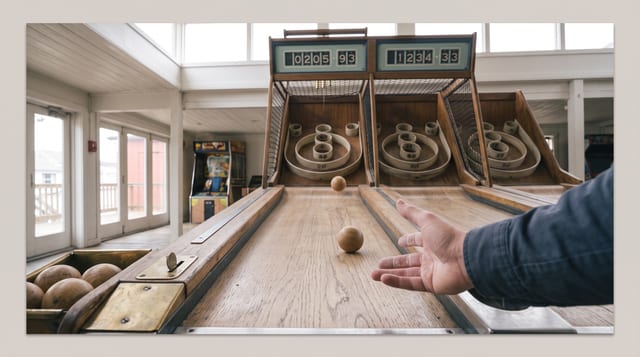
Saltwood Alley
Step up to the sunlit timber lanes of an old seaside arcade, feel the weight of turned maple in your palm, and bend real wrist-spin shots into tight vintage scoring cups.

Bottomless
Drop into a waist-deep powder bowl on the morning after the storm and feel every turn throw a wall of snow into the sun.
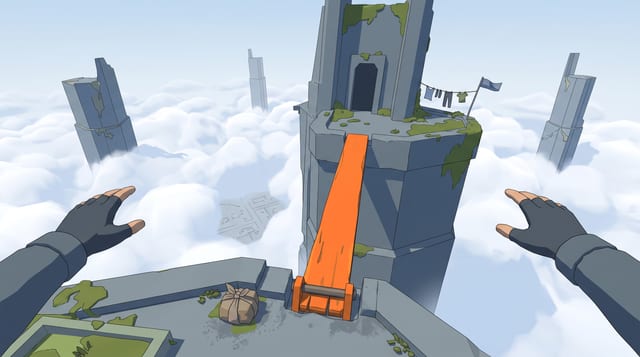
Thin Air Errands
Three hundred metres up, with a storm on the way, you carry your own plank between rooftops, lay it across the gap, and walk it with your arms out.
More Unity 6 techniques
Atmospheric Height Fog, Sun Shafts & Rim-Readable Lighting in Unity 6 URP →
Three-point outdoor/interior URP lighting recipe combining directional sun + warm/cool fill, exponential height/distance fog, ACES/Neutral post-processing, and anti-darkness floors so captures never read black or washed out.
CharacterController Slope Projection & Floor Snap in Unity 6 →
Deterministic Unity 6 CharacterController locomotion with SphereCast ground projection, ramp stickiness, steep-slope slide, and coyote jumps.
Physical 6DoF VR Hand Interactions, Throw Windows & Spatial Comfort in Unity 6 →
Tactile 6DoF VR interactions in Unity 6 using CCGD.GameXR: articulated hands that wrap what they hold, near-grab + distance-pull cones, 6-sample sliding-window throws, snap holsters, diegetic world panels, and flat+VR parity.
Frame-Rate-Independent Procedural Springs, Squash-Stretch & Trauma Feel in Unity 6 →
Exact dt-invariant second-order critically/under-damped spring dampers, Squirrel Eiserloh T^2 rotational Perlin camera trauma, volume-preserving squash-and-stretch, and TestClock-safe hit-stop.
Read via free MCP — or sign in to add techniques & beta test
Use /mcp/library free with no login to query guides, or connect via OAuth at /mcp to contribute technique guides and beta test cloud builds.