WebXR Hand Tracking & Controller Parity in Godot 4
Unified Quest bare-hand tracking and controller input in Godot 4 using GameXR pinch/grab hysteresis, fingertip poke, and button_3d.
- webxr
- vr
- hand-tracking
- quest
- pinch
- grab
- haptics
When to Use & Field Best Practices
Quest players launch WebXR games with bare hands, Touch controllers, or switch between both mid-session without reloading. Building interactions only on raw XRController3D buttons breaks bare-hand players, while assuming 25 skeletal joints leaves controller users stuck:
- Let
GameXROwn the Rig & Skinned Hands: Never instantiate a secondXROrigin3DorXRController3D. Configure locomotion and articulated hands once viaGameXR.locomotion(...)andGameXR.hands(...). - Use
pinching/grabbing+pinch_pointParity: With controllers,GameXR.Hand.pinchingtracks the trigger andgrabbingtracks grip squeeze. With tracked bare hands, both use filtered joint hysteresis automatically — no special-case branches required. - Add Subtle Tactile Feedback Safely: Call
hand.pulse(strength, seconds)on hover/snap; on bare hands it safely no-ops without errors, while controllers buzz crisply.
Mathematical & Algorithmic Core
- Pinch Activation Point: $
p_pinch = begincases (1)/(2)(p_thumb\_tip + p_index\_tip), & tracked bare hand \\ p_grip, & controller endcases$ - Reach Distance Gate: Clamp grab radius around
0.18–0.26 mon handles ("power"), balls ("sphere"), or tiny tokens ("pinch") so fingers close cleanly onto the object mesh.
Engine Implementation
Dual-Mode Hand Interaction Rig (Assets/Game/Scripts/gameplay/xr_relic_bench.gd)
extends Node3D
## Demonstrates Quest bare-hand + controller parity via GameXR signals, fingertip poke, and grabbable grips.

@export var relic_mesh: Node3D
@export var chime_pad: Node3D

var _right_pinching_last := false
var _last_source := "none"


func _ready() -> void:
	GameXR.locomotion({"speed": 2.2, "turn": "snap", "vignette": true})
	GameXR.hands({"style": "glove", "tone": "medium"})

	var rig := GameXR.rig()
	rig.pinch_started.connect(_on_pinch_started)
	rig.grab_started.connect(_on_grab_started)

	if relic_mesh != null:
		var item := GameXR.grabbable(relic_mesh, {
			"grip": "pinch",
			"reach": 0.22,
		})
		item.grabbed.connect(func(side: String) -> void:
			GameXR.hand(side).pulse(0.45, 0.03)
		)

	if chime_pad != null:
		var pad_btn := GameXR.button_3d(chime_pad, {
			"radius": 0.12,
		})
		pad_btn.pressed.connect(func(side: String) -> void:
			GameXR.hand(side).pulse(0.6, 0.04)
		)


func _process(_delta: float) -> void:
	if not GameXR.active():
		return
	var right := GameXR.hand("right")
	if right.tracked and right.source != _last_source:
		_last_source = right.source

	# Smooth continuous pinch tracking works identically for tracked fingers and analog triggers
	if right.pinching and not _right_pinching_last:
		var tip := right.joint("index-finger-tip").origin
		if relic_mesh != null and tip.distance_to(relic_mesh.global_position) < 0.25:
			right.pulse(0.35, 0.025)
	_right_pinching_last = right.pinching


func _on_pinch_started(side: String) -> void:
	var h := GameXR.hand(side)
	if h.tracked:
		var _pinch_world := h.pinch_point
		h.pulse(0.25, 0.02)


func _on_grab_started(side: String) -> void:
	GameXR.hand(side).pulse(0.4, 0.03)
Headset & Desktop Budgets
- Single WorldEnvironment & Mobile Compatibility Profile: Keep draw calls compact (
<= 200) and avoid full-screen blur filters in WebXR so stereo rendering holds 72+ Hz in Quest Browser. - Flat Play Parity: Always test interactions with mouse/keyboard fallback so desktop testers can pick up, poke, and complete every objective.
Verification Checklist
- Drive
GameXR.sim().track_hand("right", "pinch")andGameXR.sim().reach("right", ...)in a headless VR test and assertgrabandpinch_startedfire without script errors. - Confirm switching between
"controller"and"hand"sourcepreserves continuous grab state.
Official references
- WebXR Hand Input Module Level 1 Specification
- GameCrew Godot XR Kit Reference
Playable Godot 4 games made with GameCrew
Launch a real browser build using this engine and inspect its controls or fork its project tree.
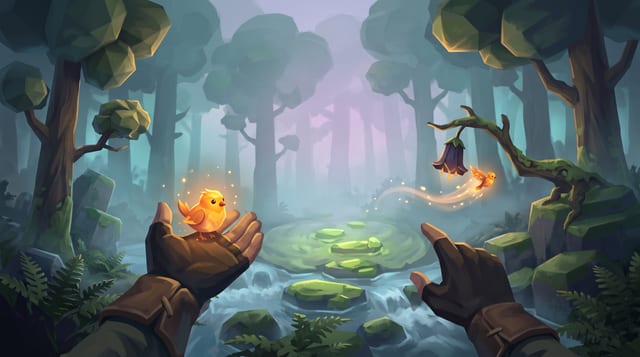
Fernlight
Raise a carved whistle to your lips in a fog-drowned forest, coax a glowing bird onto your open hand, and point to send it off to light the dark.
More Godot 4 techniques
CharacterBody3D Slopes, Snap & Coyote Jump in Godot 4 →
Crisp Godot 4 CharacterBody3D locomotion combining floor_snap_length, apex hang gravity, jump-cut, coyote time, and zero-arg move_and_slide.
Context Steering, Patrol Paths & Telegraphed Enemy Encounters in Godot 4 →
Typed GDScript 4 context steering, LevelData patrol-path following, line-of-sight perception with memory hysteresis, attack-token pacing, and telegraphed combat state machines.
Frame-Rate-Independent Springs, Squash-Stretch & Ribbon Trails in Godot 4 →
Typed GDScript 4 second-order damped springs, volume-preserving visual squash-stretch, Eiserloh T^2 FastNoiseLite camera trauma, and ImmediateMesh sword/dash ribbon trails.
Stylized Water, Gerstner Waves & Depth Shoreline Foam in Godot 4 Compatibility →
Godot 4.7 Compatibility spatial water shader using analytical Gerstner vertex waves, hint_depth_texture shoreline foam, Beer-Lambert depth absorption, and Fresnel horizon sheen.
Use verified techniques inside a real game
Describe your game idea for free or connect an MCP assistant to search and contribute techniques.