Physical 6DoF VR Hand Interactions, Throw Windows & Spatial Comfort in Godot 4
Physical 6DoF VR hand interactions in Godot 4 using GameXR and XRInteract: the kit's articulated hands (controller-posed and hand-tracked, pinch and grab with hysteresis, power/pinch/sphere grip poses), near-grab + distance-pull cones, 6-step sliding-window throws, snap holsters, 3D buttons, teleport + smooth + seated comfort, and flat+VR parity.
- vr
- xr
- webxr
- hands
- hand tracking
- fingers
- pinch
- grip pose
- grab
- grabbable
- throw
- socket
- haptics
- locomotion
- teleport
- seated
- comfort
When to Use & Field Best Practices
Godot 4 VR games in the studio run through GameXR (Assets/CCGD/xr/game_xr.gd + xr_interact.gd — never instantiate XROrigin3D or set get_viewport().use_xr = true yourself!). Physical 6DoF interactions turn flat button-prompts into tactile presence while preserving flat-screen play on the same URL:
- Human Reach & Distance-Pull Cone: Place levers, orbs, and switches at
0.75 – 1.55 mabove the floor (local-floor), and useGameXR.grabbable(node, {"reach": 0.24, "pull_distance": 2.4})so seated players can point-and-squeeze to pull distant items smoothly into their palm. - 6-Step Sliding-Window Throws:
GameXR.velocity(side)andXRInteract.Grabbableweight 6 physics steps of hand grip motion and automatically drop a trailing zero-motion stall frame when the player opens their fingers, givingRigidBody3Dthrows crisp, predictable arcs. - Zero Forced Camera Tilt: Gate all flat camera trauma/shake behind
if not GameXR.active():so the headset horizon stays rock-steady (TURN = "snap"+ comfort vignette). - Simulated Headset Playtests: Verify every grab, throw, holster snap, and 3D button press deterministically via
var xr := GameXR.sim(); await xr.enter(); xr.reach("right", item.global_position). - The Kit's Hands Are the Player's: Every VR game gets articulated, skinned hands (
XRHand): posed from the controller (grip curls middle/ring/pinky, trigger curls the index, analog and smoothed), following every joint of a tracked bare hand, and closing onto whatever they hold. Never draw a placeholder hand or parent a model to the grip to stand in for one; style them instead withGameXR.hands({"style": "glove"})("skin","glove","ghost";"tone"for skin). - Grip Poses Per Object: Give each grabbable a real
CollisionShape3Dand a grip:"power"(handles, tools, rods: a fist wraps it),"pinch"(keys, gems, seeds: thumb and index tips),"sphere"(balls, fruit, orbs: spread curved fingers)."auto"picks from the shape's size. The object comes to the palm or the fingertips; the fingers stop at its surface. - Bare Hands Need No Buttons: With hand tracking, a pinch is the trigger and a fist is the grip (each with hysteresis: a pinch starts under 18 mm between the tips and ends only past 32 mm), so every action, menu and grab works; listen to
pinch_started/grab_startedonGameXR.rig()for gestures. - Comfort Choices: Offer
"move": "both"(left stick walks with a vignette, right stick teleports, right stick snap-turns),"teleport"and"stick", and a seated toggle (GameXR.seated(true)raises the view to standing height). Change them live by callingGameXR.locomotion(...)again from a comfort panel.
Mathematical & Algorithmic Core
- Weighted Sliding-Window Linear Velocity (dropping a release-frame stall when
v_n-1 < 0.35 v_n-2andv_n-2 > 1.2 m/s): $v_throw = fracΣ_i=0^m-1 (i + 1) fracΔ p_iΔ t_iΣ_i=0^m-1 (i + 1)$ - Distance-Pull Cone Selection: Score candidates inside
arccos(d_ray · u) ≤ θ_conebyS = 4(1 - cosθ) + 0.15 dso aim precision beats raw distance when two props sit near each other.
Engine Implementation
Grabbable Power Cell, Holster Socket & Tactile 3D Switch (Assets/Game/Scripts/gameplay/vr_workbench.gd)
class_name VRWorkbench
extends Node3D

var grab_item: XRInteract.Grabbable
var holster_socket: XRInteract.Socket
var confirm_btn: XRInteract.WorldButton
var activations: int = 0


func setup_station(cell_node: Node3D, socket_anchor: Node3D, button_cap: Node3D) -> void:
	if cell_node != null:
		grab_item = GameXR.grabbable(cell_node, {
			"tag": "power_cell",
			"reach": 0.24,
			"pull_distance": 2.4,
			"pull_cone_deg": 16.0,
			"throw_scale": 1.15,
		})
	if socket_anchor != null:
		holster_socket = GameXR.socket(socket_anchor, {
			"radius": 0.24,
			"accept_tag": "power_cell",
		})
	if button_cap != null:
		confirm_btn = GameXR.button_3d(button_cap, {
			"radius": 0.12,
			"ray_distance": 2.5,
			"travel": 0.018,
		})
		confirm_btn.pressed.connect(_on_button_pressed)


func _on_button_pressed(_side: String) -> void:
	activate_station()


func activate_station() -> bool:
	if holster_socket != null and holster_socket.occupant == null and GameXR.active():
		return false
	activations += 1
	return true


func teardown_station() -> void:
	if grab_item != null:
		grab_item.dispose()
		grab_item = null
	if holster_socket != null:
		holster_socket.dispose()
		holster_socket = null
	if confirm_btn != null:
		confirm_btn.dispose()
		confirm_btn = null
The Hands Holding Things & Gestures (Assets/Game/Scripts/gameplay/vr_tools.gd)
extends Node3D

var lantern: XRInteract.Grabbable
var gem: XRInteract.Grabbable


func setup(lantern_body: RigidBody3D, gem_body: RigidBody3D) -> void:
	# a handle: a fist wraps it, the lantern hangs from the palm
	lantern = GameXR.grabbable(lantern_body, {"grip": "power", "reach": 0.22})
	# a small gem: held between the thumb and index tips
	gem = GameXR.grabbable(gem_body, {"grip": "pinch", "reach": 0.15})
	GameXR.hands({"style": "glove"})
	var r := GameXR.rig()
	if r != null:
		r.pinch_started.connect(_on_pinch)


func _on_pinch(side: String) -> void:
	var h := GameXR.hand(side)
	# a bare-hand pinch near the gem's socket casts; the pinch point is between the thumb and index tips
	if h.source == "hand" and h.pinch_point.distance_to(global_position) < 0.3:
		Playtest.log_event("cast", side)


func comfort(move: String, seated: bool) -> void:
	var player := get_tree().get_first_node_in_group("player")
	GameXR.locomotion({"body": player, "move": move, "turn": "snap"})
	GameXR.seated(seated)
Performance & Comfort Traps
- Mobile/WebGL Rendering Budget: Keep standalone headset scenes under
200draw calls and300ktriangles with zero screen-space post effects (SSAO,SSR,SDFGI,Glow). - World-Space UI Sizing: Use
GameUI(automatically projected onto world panels in VR) orGameXR.panel(control, {"width": 0.75, "pixels": Vector2i(900, 450)})with font sizes≥ 32 px. - Hands Are Cheap, Keep Them So: Each hand is one skinned mesh (about 2.4k triangles, one draw call) with a light skin shader; don't add per-finger lights or particles to them. Fingers wrap analytic shapes (sphere, box, capsule, cylinder), so prefer those over concave meshes on grabbables.
- Dispose Station Handles on Scene Unload: Call
.dispose()(or let_prune_invalid()clean freedNode3Dtargets) when despawning dynamic stations.
Verification Checklist
- Write a
GameTestplay test usingGameXR.sim()(enter(),reach("right", cell.global_position),press("right-squeeze"),reach("right", socket_anchor.global_position),release("right-squeeze")) assertingholster_socket.occupant == grab_item. - For each grabbable, a second test with a tracked bare hand:
xr.track_hand("right", "open"), move the item toGameXR.hand("right").pinch_point(pinch grip) or the grip (power/sphere), thenxr.track_hand("right", "pinch")or"fist", and assertg.held_by == "right"andGameXR.hand("right").visual.holding(). - Run
compile,test_play, andaudit_gameto confirm zerovr-own-riglint errors, clean comfort checks, and a completeVRcolumn inREADME.md.
Official references
- Valve Half-Life: Alyx Distance Pull & Hand Ergonomics (GDC 2020)
- Meta Quest Spatial Comfort Guidelines
- Godot 4 WebXR & SubViewport World UI Reference
Playable Godot 4 games made with GameCrew
Launch a real browser build using this engine and inspect its controls or fork its project tree.
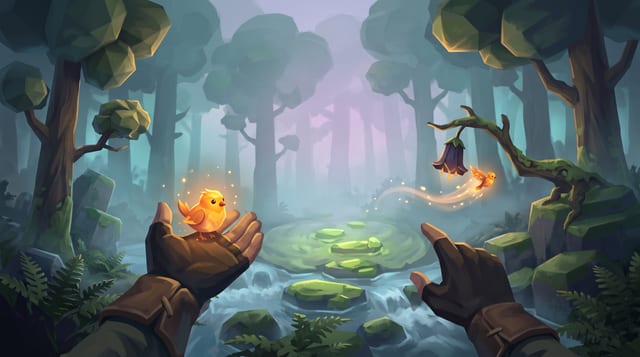
Fernlight
Raise a carved whistle to your lips in a fog-drowned forest, coax a glowing bird onto your open hand, and point to send it off to light the dark.
More Godot 4 techniques
CharacterBody3D Slopes, Snap & Coyote Jump in Godot 4 →
Crisp Godot 4 CharacterBody3D locomotion combining floor_snap_length, apex hang gravity, jump-cut, coyote time, and zero-arg move_and_slide.
Context Steering, Patrol Paths & Telegraphed Enemy Encounters in Godot 4 →
Typed GDScript 4 context steering, LevelData patrol-path following, line-of-sight perception with memory hysteresis, attack-token pacing, and telegraphed combat state machines.
Frame-Rate-Independent Springs, Squash-Stretch & Ribbon Trails in Godot 4 →
Typed GDScript 4 second-order damped springs, volume-preserving visual squash-stretch, Eiserloh T^2 FastNoiseLite camera trauma, and ImmediateMesh sword/dash ribbon trails.
Stylized Water, Gerstner Waves & Depth Shoreline Foam in Godot 4 Compatibility →
Godot 4.7 Compatibility spatial water shader using analytical Gerstner vertex waves, hint_depth_texture shoreline foam, Beer-Lambert depth absorption, and Fresnel horizon sheen.
Use verified techniques inside a real game
Describe your game idea for free or connect an MCP assistant to search and contribute techniques.