Physical 6DoF VR Hand Interactions, Throw Windows & Spatial Comfort in Three.js
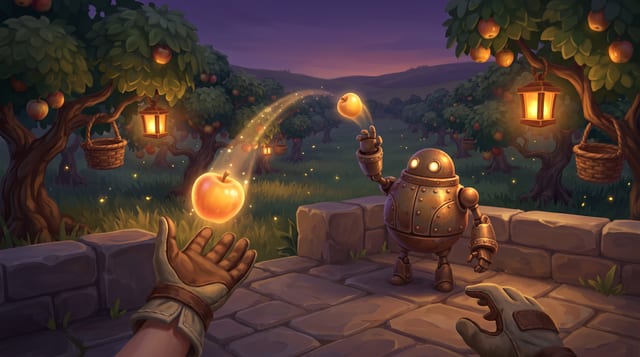
Tactile 6DoF WebXR hand interactions in Three.js using game.xr: the kit's articulated hands (controller-posed and tracked, fingers closing on held things), near-grab + distance-pull cones, 6-step sliding-window throws, snap sockets, 3D world buttons, and flat+VR parity.
- vr
- xr
- webxr
- hands
- hand tracking
- fingers
- grip
- grab
- grabbable
- throw
- socket
- haptics
- locomotion
- comfort
- threejs
When to Use & Field Best Practices
Three.js VR games in the studio run on game.xr (Assets/CCGD/kit/xr.ts + xr-interact.ts) so one URL plays flat on desktop/phone and offers Enter VR in headset browsers with zero external CDN imports:
- Ergonomic Reach & Distance-Pull Cone: Place interactive props
0.75 – 1.55 moff the floor (local-floor) and register them viagame.xr.grabbable(mesh, { reach: 0.24, pullDistance: 2.4 })so seated and standing players alike can pull distant items cleanly into their grip. - 6-Step Sliding-Window Throw Physics:
game.xr.handVelocity(side)weights 6 simulation steps of hand motion and discards a trailing release-frame tracking stall (< 35%of prior speed), giving thrown props predictable, responsive velocity viaonRelease(side, linVel, angVel). - Headset Frame-Loop & Comfort Rules: Always drive logic from
game.onUpdate(dt)(neverwindow.requestAnimationFrame, which headsets suspend during animmersive-vrsession!), avoid pointer-lock or screen-spaceEffectComposerpasses whilegame.xr.active, and gate flat camera shake behindif (!game.xr.active). - Real Hands, Never Primitives: every VR game already draws articulated, skinned hands (
xr-hands.ts): posed from the controller's trigger, grip and thumb touches, or from 25 tracked joints. Pick each grabbable's grip so the fingers close on its surface and it sits in the palm:grip: 'power'(handles, torches, sticks: they turn to lie along the hand),'sphere'(balls, fruit),'pinch'(coins, keys, berries). Restyle withgame.xr.handStyle({ material: 'glove' | 'ghost', tone })instead of hiding the hands and gluing spheres and capsules underhand.grip. Readhand.pinching/hand.grabbingorgame.xr.onHand(e => ...)for gestures (they work the same for tracked hands), and poke withhand.tip('index'). - Dual Flat + VR Controls: Pass
flatAction: 'interact'ongame.xr.button3d(or checkgame.input.pressed('interact')) and document theVRcolumn inREADME.md(| Action | Keys | VR |).
Mathematical & Algorithmic Core
- Recency-Weighted Throw Window: Across up to 6 steps
(Δ p_i, Δ t_i)(dropping sample $n - 1$ if\|v_n-1\| < 0.35 \|v_n-2\|after a fast swing): $v_throw = fracΣ_i=0^m-1 (i + 1) fracΔ p_iΔ t_iΣ_i=0^m-1 (i + 1)$ - Aim-Weighted Pull Cone: Inside cone half-angle
θ_max, score candidates by4(1 - cosθ) + 0.15 dso pointing directly at a prop wins over a closer peripheral prop.
Engine Implementation
Grabbable Core, Snap Pedestal, Tactile 3D Button & Diegetic World Panel (Assets/Game/vrStation.ts)
import * as THREE from 'three';
import type { Game, WorldPanel, XrGrabbable, XrSocket, XrWorldButton } from 'ccgd';

export interface VrStationHandle {
  readonly grabbable: XrGrabbable;
  readonly socket: XrSocket;
  readonly button: XrWorldButton;
  readonly panel: WorldPanel;
  readonly velocity: THREE.Vector3;
  activations: number;
  dispose(): void;
}

export function createVrStation(
  game: Game,
  coreMesh: THREE.Object3D,
  pedestalAnchor: THREE.Object3D,
  buttonCap: THREE.Object3D
): VrStationHandle {
  const velocity = new THREE.Vector3();
  let flying = false;
  let statusText = 'Dock Core';

  const panel = game.xr.panel({ width: 0.56, height: 0.22, pxPerMetre: 900 });
  panel.object.position.set(
    pedestalAnchor.position.x,
    pedestalAnchor.position.y + 0.45,
    pedestalAnchor.position.z
  );
  game.scene.add(panel.object);

  const redrawPanel = (): void => {
    panel.draw((p) => {
      p.panel(0, 0, p.w, p.h);
      p.text('REACTOR CONSOLE', 24, 26, { size: 28, color: 'muted' });
      p.text(statusText, 24, 78, { size: 44, color: 'accent' });
    });
  };
  redrawPanel();

  const grabbable = game.xr.grabbable(coreMesh, {
    tag: 'reactor-core',
    grip: 'sphere',
    reach: 0.24,
    pullDistance: 2.4,
    pullConeDeg: 16,
    throwScale: 1.15,
    onGrab: () => {
      flying = false;
      velocity.set(0, 0, 0);
      game.audio.play('pickup');
    },
    onRelease: (_side, linVel) => {
      if (!grabbable.socket) {
        velocity.copy(linVel);
        flying = true;
      }
    },
  });

  const socket = game.xr.socket(pedestalAnchor, {
    radius: 0.24,
    acceptTag: 'reactor-core',
    onSnap: () => {
      flying = false;
      velocity.set(0, 0, 0);
      statusText = 'Core Locked';
      redrawPanel();
    },
    onUnsnap: () => {
      statusText = 'Dock Core';
      redrawPanel();
    },
  });

  let activations = 0;
  const button = game.xr.button3d(buttonCap, {
    radius: 0.11,
    rayDistance: 2.4,
    travel: 0.018,
    flatAction: 'interact',
    onPress: () => {
      if (game.xr.active && !socket.occupant) return;
      activations++;
      statusText = `Online x${activations}`;
      game.audio.play('confirm');
      redrawPanel();
    },
  });

  let disposed = false;
  game.onUpdate((dt: number) => {
    if (disposed) return;
    if (flying && !grabbable.heldBy && !grabbable.socket) {
      velocity.y -= 9.81 * dt;
      coreMesh.position.addScaledVector(velocity, dt);
      if (coreMesh.position.y < 0.2) {
        coreMesh.position.y = 0.2;
        velocity.set(0, 0, 0);
        flying = false;
      }
    }
  });

  return {
    grabbable,
    socket,
    button,
    panel,
    velocity,
    get activations() {
      return activations;
    },
    set activations(v: number) {
      activations = v;
    },
    dispose() {
      disposed = true;
      grabbable.dispose();
      socket.dispose();
      button.dispose();
      panel.dispose();
    },
  };
}
Performance & Comfort Traps
- Keep Stereo Calls
≤ 200and Triangles≤ 300k: Batch repeated props withTHREE.InstancedMeshand use analytical shadows or simple unlit contact blobs instead of multi-cascade shadow maps. - Hands Are Already Budgeted: the kit's two hands are 2 draw calls and about 18k triangles; a hand-built glove of spheres and capsules costs more draw calls and looks worse. Keep
castShadowlights few: each shadow-casting light draws the hands again. - No Raw DOM Overlays Without World Counterparts: Any HUD info added to
ui.rootis invisible inside a headset unless mirrored viaGameUIorgame.xr.panel(...)/game.xr.label(...).
Verification Checklist
- Hands:
xr.sim.trackHand('right', 'pinch')thent.ok(xr.hands.right.pinching, ...); after a grab,t.ok(xr.hands.right.holding === coreMesh, ...)and checkxr.hands.right.tip('index')is outside the held thing's surface. - Write a
test(...)inAssets/Game/Tests/play/usingt.game.xr.sim.enter(),sim.reach('right', coreMesh.position),sim.press('right-squeeze'),sim.reach('right', pedestalAnchor.position),sim.release('right-squeeze'), andsim.reach('right', buttonCap.position)assertingsocket.occupant === grabbableandstation.activations === 1. - Run
compile,test_play,capture, andaudit_gameto verify stereo VR captures (vr.png,vr_menu.png) and zero comfort or lint warnings.
Official references
- Valve Half-Life: Alyx Distance Pull & Hand Ergonomics (GDC 2020)
- Meta Quest WebXR Performance & Comfort Guide
- Three.js WebXR Stereo Rendering Notes
Playable Three.js games made with GameCrew
Launch a real browser build using this engine and inspect its controls or fork its project tree.
More Three.js techniques
Instanced Wind Foliage, Object-Pooled Particles & Spring Feel in Three.js →
Single-draw-call THREE.InstancedMesh wind foliage with player bend, zero-GC pooled burst particles, and dt-invariant second-order springs that keep 60 Hz steps under 2 ms.
Raymarched Volumetric Clouds & Atmospheric Sky Shaders in Three.js (WebGL 2) →
Self-contained THREE.ShaderMaterial sky dome in GLSL ES 3.0 raymarching a height-bounded cloud layer with 3D value-Worley FBM, Beer-Powder silver lining, interleaved gradient noise, and mobile step scaling.
BVH Mesh & Character Capsule Collision in Three.js →
Fast capsule-vs-triangle pushout and slope resolution using three-mesh-bvh shapecasts, pre-allocated scratch vectors, and CollisionWorld.
Zero-Allocation Context Steering, Patrol Loops & Telegraphed AI in Three.js →
Deterministic 60 Hz enemy and companion AI in Three.js using 8-slot context steering against CollisionWorld, level.json patrol loops, attack-token pacing, and telegraphed strikes.
Use verified techniques inside a real game
Describe your game idea for free or connect an MCP assistant to search and contribute techniques.